
General Information

Roku TVs
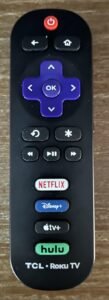
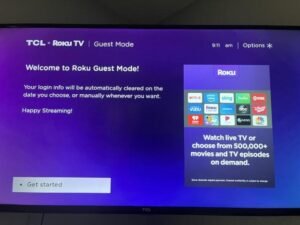
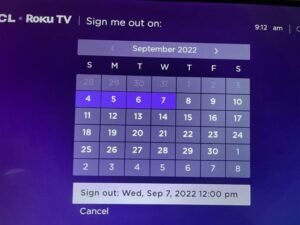
All of the Televisions in our home (7 of them!) are Roku TVs. We do not have cable / satellite. Most of the TVs are mounted to the walls with multi-angle mounts. Feel free to adjust the angle best suited to your viewing. When you first turn on the TV (red button at the top of the remote), you’ll first see a screen describing Guest Mode, then you’ll be asked to provide your checkout date. Doing so will automatically sign you out of all services (such as Netflix) on your date, so future guests won’t be able to use your accounts.
Using Guest Mode on the Roku TV
Welcome to our cabin! For your entertainment, we have provided a Roku TV that offers a variety of streaming options. To ensure your privacy and convenience, the Roku TV is set up with a Guest Mode feature. Follow these steps to use it:
- Activate Guest Mode:
- When you turn on the Roku TV, you should see an option to set a departure date, which will automatically sign you out of all accounts on that date.
- Sign In to Your Streaming Accounts:
- After entering Guest Mode, you’ll be prompted to sign in to your streaming services (such as Netflix, Hulu, Disney+, etc.).
- Use your personal login credentials for each service. Your credentials will remain secure and will be automatically removed on the departure date you set.
- Enjoy Your Viewing Experience:
- Browse and stream your favorite shows and movies as you would at home.
- If you want to add more channels, go to the Roku Channel Store and select from a wide variety of free and paid channels.
- Signing Out:
- If you finish using the TV before your departure date, you can manually sign out of your accounts.
- To do this, go to “Settings” > “System” > “Guest Mode” and select “Exit Guest Mode.”
- Confirm your choice, and the Roku TV will sign you out of all your accounts.
- Troubleshooting:
- If you encounter any issues, please contact us for assistance. We can ‘reset’ the guest mode remotely.
What about my Football Games?
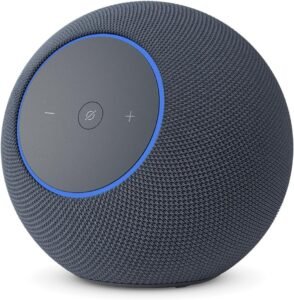
Main Level
Coming soon, we haven’t finalized plans yet
Basement Level
We think we will have a soundbar under the TV with bluetooth capabilities.
Upstairs Level
No plans for Indoor bluetooth speakers upstairs
Advanced TV Information
BYOD (Bring your Own Device)
HDMI cords are attached to the back of each TV if you would like to plug into your own devices.
Stream from Your Phone
Also, the TVs are connected to the same WiFi network as you will be using during your stay, so you should be able to easily stream audio or video from your phone (look for the

symbol on your phone) or tablet.
Upstairs Level
No plans for Indoor bluetooth speakers upstairs